
Docker has become the default starting point for any DevOps team serious about fast, consistent deployments. Over 13 million developers use Docker today, and it’s now a standard part of CI/CD pipelines across teams of every size. But as containerization matures, a common question comes up: where does Docker end and Kubernetes begin? In this guide, we cover what Docker does in a DevOps pipeline, best practices for using it effectively, and how it stacks up against Kubernetes, so you can make the right call for your team.
What is Docker?
Docker is an open-source containerization platform that allows developers to build, package, and distribute applications within containers. These containers are lightweight and portable, containing everything an application needs to run smoothly across different environments.
Docker containers also share the host operating system’s kernel, unlike virtual machines, which makes them more efficient and faster. Running applications using container images and Docker Engine to run them, Docker simplifies application management while ensuring consistent performance everywhere they’re deployed. In simple words, Docker makes it easier to create, package, ship, and deploy applications.
Benefits of Using Docker in DevOps Pipelines
1. Consistent Environments, Every Time
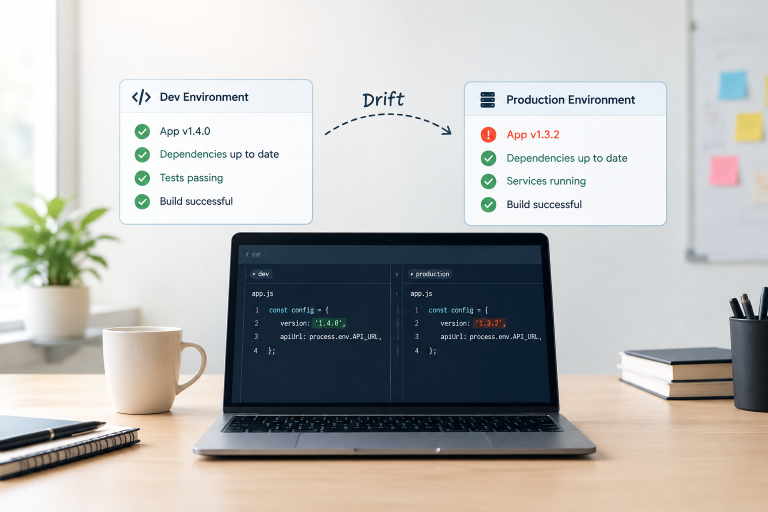
Have you ever heard the phrase “it works on my machine”? Docker solves that problem. It packages everything an application needs — libraries, dependencies, and configurations — into a container. Whether you’re coding on your laptop, running tests, or deploying to production, the application behaves the same.
With tools like Docker Compose, developers can even recreate complex environments on their local machines, catching issues early and saving time.
2. Seamless CI/CD Integration
Docker fits right into the DevOps pipeline. It works hand-in-hand with tools like Jenkins, GitLab CI, and GitHub Actions. Here’s how it helps:
- Build: Docker turns your code into a container image.
- Test: Run automated tests inside isolated containers.
- Deploy: Push tested images to a container registry.
- Launch: Easily deploy containers using Kubernetes or Docker Swarm.
With a CI/CD pipeline as a service powered by Docker, you’ll achieve smoother deployments and get your software to users faster.
3. Get to Market Faster
Docker speeds up development and deployment. Specifically, containers launch in seconds, making it easy to test new features or fix bugs quickly. Furthermore, with multi-stage builds, you get leaner container images, which means faster builds and deployments.
By eliminating environment issues, enhancing automation, and supporting scalable architectures, Docker is an invaluable asset for any DevOps pipeline.
4. Enhanced Security
Docker comes with strong security features that help protect your applications. Since containers run in isolated environments, any issues in one container won’t affect others or the host system. This containment reduces the risk of spreading threats.
You can also apply strict access controls using Docker’s tools, like role-based permissions and image signing, ensuring only authorized users and verified images are used. Additionally, Docker makes it easy to scan images for vulnerabilities, catching potential risks before they make it to production. With these layers of protection, Docker adds an extra shield of security to your DevOps pipeline.
5. Perfect for Microservices and Scaling
For microservices applications, Docker makes life easier. With Containers and Kubernetes, each service runs on its own, so you can update or scale parts of your app without worrying about the rest. It’s a smart way to keep everything running smoothly, even when traffic surges.
Best Practices for Using Docker in DevOps
Here’s how you can use Docker effectively in your DevOps pipeline:
- Keep It Light: Smaller images are faster to build, transfer, and run. Start with a lightweight base image and only add what your app really needs.
- Use Multi-Stage Builds: Think of it like meal prep — keep the kitchen messy while you cook, but serve only the final, polished dish. Multi-stage builds help you leave unnecessary files behind, resulting in a clean and efficient image.
- Tag Smartly: Don’t rely on the default latest tag. Version your images clearly so you always know what’s running and can roll back if needed.
- Stay Secure: Docker is great, but it’s not invincible. Scan your images for vulnerabilities, set up access controls, and only use images from trusted sources. Tools like Trivy, Docker Scout, and Snyk Container can help keep things safe: all three integrate directly into your CI pipeline for automated image scanning
- Handle Secrets with Care: Never store passwords, API keys, or sensitive data directly in your Dockerfiles. Use Docker Secrets or environment variables to keep your information secure.
- Control Network Access: Docker’s networking capabilities let you isolate containers so they can only talk to each other when needed. This helps minimize security risks and keeps things tidy.
- Simplify Local Development: Docker Compose is your friend for running multiple containers in development. It makes it easy to spin up everything your app needs, from databases to services, with just one command.
- Monitor and Log: Keep an eye on how your containers are doing using tools like Prometheus or the ELK Stack. Catching issues early means fewer headaches later.
- Set Limits: Prevent resource hogging by setting memory and CPU limits on your containers. This ensures no single container takes down your entire system.
- Clean Up Regularly: Docker can gather unnecessary files over time. Running
docker system prunetidies up your workspace, keeping things smooth.
Use Cases of Docker
Docker makes life easier for developers and operations teams by simplifying how applications are built, tested, and deployed. Specifically, here’s how it’s commonly used:
- Development and Testing: Developers can create consistent environments on their local machines using Docker. This helps catch bugs early and eliminates the “it works on my machine” problem.
- CI/CD Pipelines: Tools like Jenkins, GitLab CI, and GitHub Actions work smoothly with Docker to automate building, testing, and deploying applications, speeding up releases.
- Container Orchestration: In production, Docker containers are managed using platforms like Kubernetes. This makes scaling, deploying, and monitoring applications a breeze.If your team is evaluating container orchestration options, see how Sygitech approaches DevOps automation for growing engineering teams.
- Monitoring and Logging: Docker integrates with tools like Prometheus and ELK Stack, providing valuable insights into app performance and quickly spotting issues.
With Docker, teams can work more efficiently, ship faster, and ensure applications run smoothly from development to production.
Docker vs Kubernetes for DevOps Teams: What’s the Difference?
Docker and Kubernetes are often mentioned together, but they solve different problems. Understanding the distinction helps you use both more effectively.
Docker handles the packaging and running of containers. It takes your application, bundles it with everything it needs, and runs it consistently anywhere — on your laptop, a test server, or in production.
Kubernetes handles the orchestration of many containers running across many machines. It decides where containers run, restarts them if they crash, scales them up under load, and manages traffic between them.
A simple way to think about it: Docker builds and runs the containers. Kubernetes manages them at scale.
| Docker | Kubernetes | |
|---|---|---|
| Primary role | Build & run containers | Orchestrate containers at scale |
| Best for | Single host, local dev, CI/CD | Multi-node production deployments |
| Complexity | Low — easy to get started | Higher — needs setup and configuration |
| Scaling | Manual or via Docker Swarm | Automatic, built-in |
| Current stable version | Docker Engine 27.x (2025) | Kubernetes 1.30 (2025) |
When to use just Docker: Small teams, early-stage apps, local development, and CI/CD pipelines where you’re not yet dealing with hundreds of containers.
When to add Kubernetes: When you’re running microservices across multiple servers, need zero-downtime deployments, or managing containers at a scale where manual oversight isn’t practical.
Most mature DevOps setups use both: Docker to build and package, Kubernetes to deploy and manage. Sygitech’s DevOps and Automation Services help teams set up and manage both, depending on where you are in your containerization journey.
Conclusion:
Docker is a powerful ally for DevOps as a Service, making the entire software development and deployment process smoother and more efficient. It takes the hassle out of managing different environments, speeds up your CI/CD processes, and helps you use resources wisely. With Docker, teams can focus on building great software instead of worrying about infrastructure headaches.
Whether you’re new to DevOps or refining your current pipelines, Docker brings the flexibility and reliability you need. It’s the key to faster releases, better teamwork, and smoother operations — helping your business stay ahead in a competitive world.