

Why Hidden Infrastructure Bottlenecks That Slow Down SaaS Applications Are So Hard to Catch
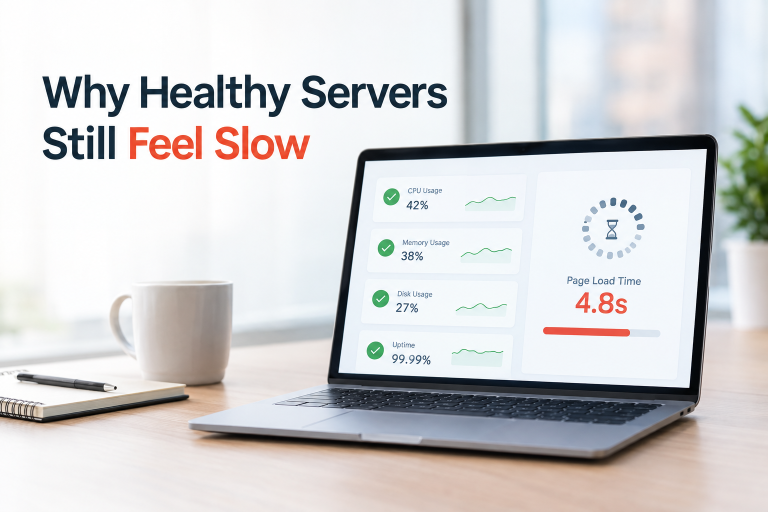
Your SaaS application passes load testing with flying colours. Latency looks acceptable on the dashboard. And yet, real users are complaining. Pages feel sluggish. API calls time out under moderate traffic. Support tickets pile up.
The hidden infrastructure bottlenecks that slow down SaaS applications are the most dangerous kind of performance problem, because they don’t announce themselves. Unlike a crashed server or a failed deployment, these issues live in the grey zone. The application technically works, but performance silently degrades, eroding user trust and accelerating churn.
For SaaS companies operating in competitive markets, slow is the new down. Users abandon web applications that don’t load within 3 seconds, and for B2B SaaS platforms serving enterprise users, latency directly impacts productivity and renewal decisions. Businesses that invest in IT infrastructure consulting services before a scaling event consistently catch these issues earlier, when they are cheap to fix, rather than after an incident has already damaged customer relationships.
In this guide, we dig into the nine most common hidden bottlenecks that cause SaaS performance degradation, the ones your basic monitoring often won’t catch, along with practical and actionable steps to resolve each one.
Database Connection Pool Exhaustion
What it is
Every time your application queries the database, it borrows a connection from a pool. When that pool runs dry because too many concurrent requests are holding connections open, new queries queue up and wait. Response times spike. Under heavy load, requests begin timing out entirely.
The tricky part is that this bottleneck often looks like a slow database on your monitoring dashboard, not a connection management problem.
Why it happens in SaaS
Multi-tenant SaaS applications experience bursty, unpredictable traffic. A single large enterprise tenant running a bulk export or scheduled report can consume a disproportionate share of your connection pool, leaving nothing for other tenants.
Signs you’re hitting this bottleneck
- Average DB query time looks normal, but P95 and P99 latencies are dramatically higher
- Errors like too many connections or connection timeout appear in logs during peak hours
- CPU and memory on your DB instance look healthy even during slowdowns
What to do
# Example: PostgreSQL connection pool config in PgBouncer

[databases]

mydb = host=127.0.0.1 port=5432 dbname=mydb

[pgbouncer]

pool_mode = transaction       # Use transaction-level pooling for SaaS workloads

max_client_conn = 1000        # Max clients connecting to PgBouncer

default_pool_size = 25        # Connections per (db, user) pair to actual Postgres

min_pool_size = 5

reserve_pool_size = 5

reserve_pool_timeout = 3- Use a connection pooler like PgBouncer (PostgreSQL) or ProxySQL (MySQL) in transaction mode
- Set per-tenant connection limits to prevent any single tenant from monopolising the pool
- Monitor connection wait time as a dedicated metric, not just query execution time
- Implement circuit breakers that fail fast when pool saturation is detected
The N+1 Query Problem
What it is
The N+1 query problem is one of the most notorious and most commonly overlooked database performance issues in SaaS applications. It occurs when your code fetches a list of records (1 query), then runs a separate query for each record to fetch related data (N queries). What looks like a single page load silently triggers hundreds of database round trips.
A real-world scenario
Imagine a SaaS dashboard that displays all projects for a user, along with the owner’s name and the latest activity for each project. With lazy loading:
# BAD: N+1 query pattern

projects = Project.objects.filter(team_id=team_id)  # 1 query

for project in projects:

    print(project.owner.name)        # 1 query per project

    print(project.latest_activity)   # 1 query per project

# If there are 50 projects, this produces 101 database queries for one page load

# GOOD: Eager loading with select_related / prefetch_related

projects = Project.objects.filter(team_id=team_id)\

    .select_related('owner')\

    .prefetch_related('activities')

# Result: 2 to 3 queries total regardless of project count
Why it’s hidden
N+1 problems are invisible in unit tests and low-traffic environments. They only surface when tenant data grows, and by then the affected pages are already noticeably slow.
What to do
- Use ORM query inspection tools such as Django’s django-debug-toolbar, Laravel’s Telescope, or Rails’ Bullet gem
- Enable slow query logging on your database (log queries over 100ms)
- Consider a DataLoader pattern for GraphQL APIs to batch and cache requests per request lifecycle
- Conduct regular query audits on high-traffic endpoints, not just during development
Noisy Neighbour in Multi-Tenant Architecture
What it is
In a shared infrastructure SaaS model, all tenants run on the same underlying compute, database, or caching layer. When one tenant generates unusually high load through a large data export, a runaway scheduled job, or a spike in API calls, they consume shared resources and degrade performance for every other tenant. This is the noisy neighbour problem.
Why it’s particularly damaging for SaaS
Your SLA is with each individual customer. When one tenant’s behaviour degrades performance for another tenant who is doing nothing wrong, the affected customer has no visibility into why their experience is suffering. They just know your platform is slow.
Signs of a noisy neighbour issue
- Performance complaints cluster around specific time windows, often correlated with another tenant’s batch jobs
- Metrics look average across the board, but specific tenants report severe slowness
- Cache hit rates drop suddenly without an obvious cause
What to do
- Implement tenant-level resource quotas at the database, cache, and API layers
- Use rate limiting per tenant at the API gateway level (Kong, AWS API Gateway, or NGINX)
- Move large batch jobs and data exports to an async queue with dedicated workers, isolated from real-time request handlers
- Consider tenant tiering to isolate your largest tenants onto dedicated infrastructure while keeping smaller tenants on shared infrastructure
# Example: Kubernetes ResourceQuota per tenant namespace

apiVersion: v1

kind: ResourceQuota

metadata:

  name: tenant-quota

  namespace: tenant-acme-corp

spec:

  hard:

    requests.cpu: "2"

    requests.memory: 4Gi

    limits.cpu: "4"

    limits.memory: 8Gi
This is one area where teams supported by managed IT services have a clear advantage. Dedicated operations partners enforce tenant isolation boundaries as part of their standard runbooks, rather than leaving them as “we’ll fix it when it breaks” backlog items.
Misconfigured or Absent CDN Layers
What it is
A Content Delivery Network (CDN) caches your static and semi-dynamic content at edge nodes located close to your users around the world. Without a properly configured CDN, every request travels all the way to your origin server, adding latency that compounds with every user in every geography.
The common mistake isn’t the absence of a CDN altogether. It is misconfiguration: cache-control headers that force revalidation on every request, missing cache keys for API responses, or overly aggressive cache-busting.
The geography problem
SaaS platforms often have users spread across multiple regions. A user in Mumbai hitting an origin server in US-East experiences dramatically higher latency than a user in New York, not because your infrastructure is slow, but because of physics. Round-trip time (RTT) from India to the US can add 200 to 300ms per request, which stacks up significantly across page loads.
What to do
- Audit your Cache-Control headers using browser DevTools or curl -I <url>
- Cache API responses that change infrequently (lookup tables, configuration, user permissions) with appropriate TTLs
- Use stale-while-revalidate for content that can tolerate being slightly out of date
- Implement edge caching for authenticated API responses using Cloudflare, AWS CloudFront, or Fastly
- Review your CDN cache hit ratio metric. If it is below 70 to 80%, you are leaving significant performance on the table
Synchronous Blocking in Microservices
What it is
In a microservices architecture, services communicate with each other to fulfil a request. When those calls are synchronous, meaning Service A waits idle for Service B to respond, a slow downstream service creates a cascading bottleneck.
This is especially damaging in deep call chains. If a user-facing request triggers calls to five downstream services in sequence and each adds 50ms of latency, your user waits 250ms just in inter-service communication before any business logic runs.
A common real-world example
A SaaS billing service that checks entitlements synchronously on every API request, including calls that have nothing to do with billing:
User API Request

  > Auth Service (50ms)

  > Entitlement Service (80ms)  [unnecessary synchronous check]

  > Core Business Logic (40ms)

  > Response

Total: 170ms for a 40ms operation
What to do
- Identify which downstream calls are truly required in the critical path versus those that can run asynchronously
- Use async messaging (Kafka, RabbitMQ, AWS SQS) for non-critical operations like notifications, audit logs, and analytics events
- Cache entitlement checks, feature flags, and configuration data locally in each service with a short TTL
- Set timeouts and circuit breakers on every outbound service call to prevent unbounded waits
- Use distributed tracing (Jaeger, Zipkin, AWS X-Ray) to visualise your call chains and identify the slowest legs
Auto-Scaling Lag and Cold Start Delays
What it is
Cloud auto-scaling is powerful but not instantaneous. When a traffic spike hits, your auto-scaling policy needs to detect the spike, provision new instances, wait for them to boot, pull Docker images, warm up runtime environments, and begin accepting traffic. This process can take anywhere from 30 seconds to several minutes depending on your stack.
During that gap, your existing instances are overwhelmed. Latency spikes. Queues back up. By the time new capacity comes online, some users have already given up.
The serverless cold start variant
If you are using AWS Lambda, Google Cloud Functions, or Azure Functions, cold starts introduce latency whenever a function instance hasn’t been invoked recently. For functions with large runtimes or significant initialisation code, cold starts can add 1 to 3 seconds of latency. This is invisible in average response time metrics but brutal for real users.
What to do
- Scale out proactively, not reactively. Use predictive scaling based on historical traffic patterns rather than waiting for CPU thresholds to trigger
- Set aggressive target tracking policies and scale at 50 to 60% CPU utilisation rather than the default 70 to 80%
- Use warm pools (AWS) or minimum instance counts to keep pre-warmed capacity ready
- For Lambda, use Provisioned Concurrency for latency-sensitive functions
- Pre-bake dependencies into your AMI or Docker image to reduce warm-up time
- Add a startup readiness probe in Kubernetes so new pods only receive traffic when fully initialised
Log and Monitoring Overhead at Scale
What it is
As your SaaS application scales, so does the volume of logs, metrics, and traces it generates. At high scale, the monitoring infrastructure itself becomes a performance bottleneck, especially if your application is doing synchronous writes to logging systems on the critical path of request handling.
The irony here is real: the more complex your system becomes, the more observability you need. But unoptimised observability can degrade the very performance you are trying to measure.
Common manifestations
- Applications writing logs synchronously to disk, blocking the request thread while waiting for I/O
- Distributed tracing agents running at 100% sampling on production traffic, adding measurable overhead to every request
- Metrics exporters using excessive memory, causing GC pressure and latency spikes in JVM-based services
What to do
- Always use async log writers and write to an in-memory buffer that flushes asynchronously
- Implement log sampling in production: log 100% of errors but sample 1 to 5% of informational logs for high-traffic paths
- Set your distributed tracing sample rate to 5 to 10% for high-volume services
- Ship logs to centralised systems (ELK stack, Loki, Datadog) via a sidecar agent pattern
- Regularly audit your metric cardinality, as high-cardinality labels in Prometheus can cause memory issues and query timeouts
Memory Leaks in Long-Running Services
What it is
SaaS applications typically run as long-lived processes, containers or VMs that stay up for days, weeks, or months. A small memory leak that is harmless in a short-lived process becomes catastrophic in a long-running service. Memory grows gradually until the process begins swapping, causing severe latency degradation before an eventual crash.
Common sources in SaaS applications
- Event listener accumulation: Listeners registered but never deregistered as objects go out of scope
- Cache growth without eviction: In-memory caches that grow unbounded because TTL or max-size limits were never set
- Database connection leaks: Connections acquired in exception paths that never reach the cleanup block
- Closure captures in JavaScript/Node.js: Variables captured by closures inside event loops that prevent garbage collection
What to do
- Monitor heap usage over time, not just point-in-time snapshots. An upward trend across restarts is the clearest signal
- Set memory limits on all containers and alert when a container approaches its limit before it gets OOM-killed
- Use language-specific heap profiling tools such as jmap and jvisualvm for Java, Node.js –inspect with Chrome DevTools, and memory_profiler for Python
- Implement scheduled memory profiling in staging environments with realistic data volumes and long-running tests
- Use bounded caches and always set maxSize and TTL on in-memory caches (Caffeine for Java, node-cache for Node.js)
SaaS Infrastructure Performance Optimization: A Systematic Diagnosis Framework
Identifying hidden bottlenecks requires more than dashboards showing average response time. Here is the SaaS infrastructure performance optimization approach used by high-performing engineering teams and the same framework applied by Sygitech when working with clients on infrastructure audits.
Step 1: Establish P99 Latency as Your Primary Metric
Averages hide the worst experiences. A 95th or 99th percentile latency view tells you what your slowest users are experiencing. Track P99 latency per endpoint, not just across the application.
Step 2: Implement Distributed Tracing
Tools like Jaeger, Zipkin, or AWS X-Ray give you a visual trace of every request across every service, including where time is being spent. This is the fastest way to identify which layer (database, cache, external service, or inter-service call) is contributing to latency.
Step 3: Build a Performance Baseline
Run load tests at 50%, 100%, and 150% of your expected peak traffic and record how each metric changes. Bottlenecks often only appear at a specific threshold. This is one of the first steps any IT infrastructure consulting services engagement will include, because baselines turn vague complaints into precise and fixable numbers.
Step 4: Run Chaos Engineering Experiments
Deliberately inject slowness into downstream services through latency injection, or kill individual instances and observe how the system degrades. This reveals cascading bottlenecks before your users find them.
Step 5: Use APM Tools for Continuous Visibility
Application Performance Monitoring tools such as Datadog APM, New Relic, Dynatrace, or open-source alternatives like SigNoz give you continuous visibility into database query patterns, service call chains, error rates, and infrastructure utilisation from a single pane of glass. Teams on managed IT services plans typically have these tools pre-configured and monitored 24/7, removing the operational burden from in-house engineers entirely.
Quick Reference: Bottleneck Diagnosis Cheat Sheet
| Bottleneck | Key Metric to Watch | Primary Fix |
| Connection Pool Exhaustion | Connection wait time, pool saturation % | PgBouncer / ProxySQL in transaction mode |
| N+1 Query Problem | Query count per request, slow query log | ORM eager loading, query audit |
| Noisy Neighbour | Per-tenant latency percentiles | Tenant-level rate limiting and quotas |
| CDN Misconfiguration | Cache hit ratio, TTFB by geography | Audit Cache-Control headers |
| Synchronous Service Calls | Call chain depth, per-service latency | Async messaging, caching at boundary |
| Auto-Scaling Lag | Scaling event to first request time | Predictive scaling, warm pools |
| Monitoring Overhead | Monitoring agent CPU/memory usage | Async logging, trace sampling |
| Memory Leaks | Heap usage trend over time | Bounded caches, heap profiling |
Conclusion
The hidden infrastructure bottlenecks that slow down SaaS applications don’t wait for a convenient moment. They surface during your busiest periods, your most important demos, and your highest-traffic days. Unlike obvious failures, they accumulate gradually, degrading user experience and driving churn long before anyone raises a formal incident.
The good news is that each bottleneck covered here is solvable with the right tooling, monitoring practices, and architectural discipline. Teams that consistently deliver fast and reliable SaaS applications treat performance as a continuous engineering concern, not a one-time optimisation pass.
For many scaling SaaS companies, the fastest path to resolving these issues is working with IT infrastructure consulting services that specialise in cloud performance audits. And for ongoing stability, managed IT services ensure your infrastructure is monitored, tuned, and optimised continuously so your engineering team stays focused on shipping product rather than fighting fires.
At Sygitech, we help SaaS companies identify and resolve infrastructure bottlenecks across cloud, DevOps, and database layers, from connection pool exhaustion to multi-tenant isolation to microservices latency.
Struggling with SaaS infrastructure performance? Talk to the Sygitech team
Tags: SaaS Infrastructure, Hidden Infrastructure Bottlenecks, SaaS Infrastructure Performance Optimization, IT Infrastructure Consulting Services, Managed IT Services, Database Performance, Cloud DevOps, Connection Pooling, Multi-Tenant Architecture, Microservices, Auto-Scaling, Application Performance Monitoring