Google Cloud Platform — commonly searched as GCP Google Cloud — is Google's suite of cloud computing services that runs on the same infrastructure Google uses internally for products like Search, Gmail, and YouTube. If you are a small business owner, a SaaS founder, or running an ecommerce store and wondering whether GCP Google Cloud is the right infrastructure for your business, this guide walks you through exactly what it offers, how it compares to rivals, what it costs, and how to get started.
What Is Google Cloud Platform (GCP)?
GCP Google Cloud is a collection of over 200 cloud services — covering compute power, data storage, machine learning, networking, and developer tools — delivered over the internet from Google's global network of data centers. You do not buy hardware. You rent capacity from Google and pay for what you use.
Think of it this way: instead of buying a server room, maintaining physical machines, and hiring a team to keep everything running, you access the same computing power through a browser or an API. Google handles the hardware, the cooling, the power, and the physical security.
GCP Google Cloud is built on the same cloud computing infrastructure that powers Google's own global products — which means the underlying network is battle-tested at a scale very few companies can match. Google's private fiber network connects its data centers across 40 regions and 121 zones worldwide, giving businesses genuinely low-latency access across continents.
For Indian businesses in particular, GCP Google Cloud operates data centers in Mumbai and Delhi NCR, meaning your data can stay within India's borders while still accessing Google's full global network when needed.
The Google Cloud Console
The Google cloud console (also called the Google Cloud Platform Console) is the web-based interface where you manage everything. You access it at console.cloud.google.com. From the console, you can spin up virtual machines, create databases, monitor costs, set up security policies, and deploy applications — all without touching a command line if you prefer. The console google cloud platform experience is designed to be visual and accessible, though experienced developers often prefer the Cloud Shell terminal built directly into the browser.
GCP vs AWS vs Azure: Key Differences
GCP Google Cloud competes directly with Amazon Web Services (AWS) and Microsoft Azure. All three offer broadly similar capabilities — compute, storage, databases, AI tools — but they differ in pricing philosophy, strengths, and ecosystem fit.
Comparing the Three Major Cloud Providers
Feature
GCP Google Cloud
AWS
Azure
Pricing model
Per-second billing, sustained use discounts automatic
Per-hour or per-second, reserved instances
Pay-as-you-go, reserved capacity
Strongest capability
Data analytics, machine learning, Kubernetes
Broadest service catalog, market leader
Microsoft ecosystem integration
Free tier
$300 credit + always-free products
12-month free tier + always-free
$200 credit + 12-month free services
Global regions
40 regions, 121 zones
33 regions, 105 zones
60+ regions
India data centers
Mumbai, Delhi NCR
Mumbai, Hyderabad
Pune, Chennai, Mumbai
Best for
Data-heavy workloads, Kubernetes, ML
Widest service choice, enterprise
Microsoft stack, hybrid cloud
The clearest way to think about the difference: AWS has the most services and the largest ecosystem. Azure wins when your business already runs on Microsoft tools like Office 365 or Active Directory. GCP Google Cloud wins on data analytics, machine learning, and Kubernetes — because Google invented Kubernetes and runs the world's largest search index.
For SaaS product companies building data pipelines or training ML models, GCP Google Cloud's BigQuery and Vertex AI are genuinely ahead of comparable offerings. For ecommerce businesses already using Google Analytics and Google Ads, the native data integration between GCP Google Cloud and Google's marketing tools is a real operational advantage.
GCP Services and Products Overview
GCP Google Cloud organizes its 200+ services into logical categories. Here are the ones most relevant to small businesses, SaaS companies, and ecommerce operations.
Compute
Compute Engine: Virtual machines you configure yourself — choose CPU, RAM, operating system, and storage. Good for businesses migrating existing applications to the cloud.
Google Kubernetes Engine (GKE): Managed Kubernetes for containerized applications. GCP Google Cloud's strongest compute offering for SaaS companies running microservices.
Cloud Run: Serverless containers — you deploy your code, Google handles scaling automatically. No server management at all.
App Engine: Fully managed platform for web applications. You write the app, GCP handles everything else.
Storage and Databases
Cloud Storage: Object storage for files, images, videos, and backups. Ecommerce businesses use this for product image hosting and order data archiving.
Cloud SQL: Managed MySQL, PostgreSQL, and SQL Server. Familiar databases without the maintenance overhead.
Firestore: NoSQL document database for real-time mobile and web applications.
BigQuery: Google's serverless data warehouse. You can run SQL queries across terabytes of data in seconds. This is where GCP Google Cloud genuinely outpaces the competition.
AI and Machine Learning
GCP Google Cloud's AI products are built on the same research that produced Google Translate, Google Photos, and Bard. For businesses interested in AI and Cloud capabilities, the key services include:
Vertex AI: Build, train, and deploy machine learning models without deep ML expertise.
Document AI: Extract structured data from PDFs and scanned documents automatically.
Vision AI: Analyze images for objects, faces, text, and sentiment.
Translation API: Real-time language translation at scale.
Networking
GCP Google Cloud's global network is one of its most underrated advantages. Traffic between your application and your users travels over Google's private fiber backbone — not the public internet — for most of its journey. This reduces latency and improves reliability compared to providers that rely more heavily on public internet routing.
GCP Pricing and Cost Structure
GCP Google Cloud pricing follows a consumption model — you pay for what you use, measured in seconds for compute and gigabytes for storage.
Three things make GCP Google Cloud's pricing model stand out:
Sustained use discounts: If you run a virtual machine for more than 25% of a month, GCP automatically applies a discount — no commitment required. Run it all month and you get up to 30% off the base price automatically.
Per-second billing: Compute Engine charges by the second after the first minute. If your job finishes in 90 seconds, you pay for 90 seconds — not a full hour.
Committed use discounts: If you know you will need consistent capacity for one or three years, you can commit and save up to 57% compared to on-demand pricing.
Typical Cost Ranges
A small business running a standard web application on GCP Google Cloud might spend between ₹3,000 and ₹15,000 per month depending on traffic and database size. A SaaS product company with moderate user load typically spends ₹20,000 to ₹1,00,000 per month. High-traffic ecommerce operations with large data warehouses can spend significantly more — but the BigQuery pricing model (₹400 per terabyte of data scanned) often makes it cheaper than running equivalent analytics infrastructure yourself.
GCP Google Cloud also offers an always-free tier that includes:
* 1 f1-micro Compute Engine instance per month
* 5 GB of Cloud Storage
* 10 GB of BigQuery storage with 1 TB of queries per month
The $300 free credit (approximately ₹25,000) for new accounts gives you 90 days to test GCP Google Cloud services before spending a rupee.
Key Insight: GCP Google Cloud's automatic sustained use discounts are the single biggest pricing advantage for businesses running workloads continuously — you get the discount without signing a contract or making a commitment.
GCP Security and Compliance Features
Security in Cloud environments is the concern most businesses raise first — and GCP Google Cloud addresses it at multiple layers.
Built-In Security Architecture
GCP Google Cloud uses a shared responsibility model. Google secures the physical infrastructure, the network, and the base platform. You are responsible for securing your applications, data access, and user permissions. This division is explicit and well-documented — unlike some providers where the boundary is ambiguous.
Key security features built into GCP Google Cloud:
Identity and Access Management (IAM): Control exactly who can access what. You can grant a developer access to a specific database without giving them access to billing or networking.
VPC Service Controls: Create security perimeters around sensitive data to prevent exfiltration even if credentials are compromised.
Cloud Armor: DDoS protection and web application firewall for internet-facing applications.
Data encryption: All data in GCP Google Cloud is encrypted at rest and in transit by default, using AES-256 encryption. You can also manage your own encryption keys through Cloud KMS.
Compliance Certifications
GCP Google Cloud holds over 100 compliance certifications globally, including ISO 27001, SOC 1/2/3, PCI DSS (relevant for ecommerce businesses handling card payments), and GDPR compliance for European data. For Indian businesses, GCP Google Cloud's Mumbai and Delhi NCR regions support data residency requirements under India's data protection framework.
According to Google Cloud's security documentation, Google employs more than 750 security engineers dedicated exclusively to infrastructure security — a level of investment no individual business could replicate on its own.
Getting Started with Google Cloud
Starting with GCP Google Cloud takes less time than most people expect. Here is the practical path:
Create a Google account: If you use Gmail, you already have one. Go to console.cloud.google.com and sign in.
Activate the free trial: Enter billing information to activate your $300 credit. You will not be charged until you explicitly upgrade to a paid account.
Create a project: In the Google Cloud Console, every resource lives inside a project. Create one project per application or business unit to keep billing and access control clean.
Choose your first service: For most small businesses, start with Cloud SQL (managed database) or Cloud Storage (file storage). For SaaS companies, start with Cloud Run for application hosting.
Set a billing budget alert: In the Google Cloud Platform Console, navigate to Billing > Budgets and set an alert at your expected monthly spend. GCP will email you before you exceed it.
Explore the Google Cloud Console: The console google cloud platform interface has a search bar at the top — type any service name to find it instantly. The left sidebar organizes services by category.
The learning curve for GCP Google Cloud is real but manageable. Google provides free training through Google Cloud Skills Boost (formerly Qwiklabs), where you can complete hands-on labs in a real GCP environment without risking your own account.
GCP Use Cases and Benefits
GCP Google Cloud serves different business types in meaningfully different ways.
For Small Businesses
The primary benefit is eliminating infrastructure overhead. You do not need a server, an IT administrator, or a disaster recovery plan — GCP Google Cloud handles all three. A small business running a website, a CRM, and basic file storage on GCP Google Cloud typically pays less than the cost of one physical server per year, with better uptime and automatic backups included.
Cloud Computing and Cloud Technology together give small businesses access to enterprise-grade reliability that was previously available only to large corporations with dedicated IT teams.
For SaaS Product Companies
GCP Google Cloud's Kubernetes Engine and Cloud Run are purpose-built for the way modern SaaS products scale. When your user count doubles overnight, Cloud Run scales automatically — you pay for the traffic, not for idle servers waiting to handle a spike. BigQuery lets SaaS companies offer their customers data analytics features without building a data warehouse from scratch.
For Ecommerce Businesses
Ecommerce operations benefit from three specific GCP Google Cloud capabilities. Cloud CDN delivers product images and static content from the nearest Google edge location, reducing page load times globally. Cloud SQL handles transactional data reliably with automatic failover. And BigQuery connects directly to Google Analytics 4, giving ecommerce teams a complete picture of customer behavior without exporting data between platforms.
Industry data shows that businesses migrating to managed cloud services reduce infrastructure management time by an average of 40%, freeing technical teams to focus on product development rather than server maintenance.
Common Questions About GCP Google Cloud
Is GCP Google Cloud suitable for a small business with no technical team?
GCP Google Cloud can work for small businesses without a dedicated technical team, but it does require some setup knowledge. The Google Cloud Console is designed to be accessible, and Google's documentation is thorough. For businesses that want to use GCP Google Cloud without managing it themselves, managed cloud service providers like Sygitech handle the configuration, monitoring, and optimization on your behalf — so you get the benefits of GCP without needing an in-house cloud engineer.
How does GCP Google Cloud handle data stored in India?
GCP Google Cloud operates data centers in Mumbai (asia-south1) and Delhi NCR (asia-south2). When you create resources in these regions, your data stays within India's borders. You can enforce this through organization policies in the Google Cloud Platform Console that prevent resources from being created outside specified regions. This matters for businesses subject to India's data localization requirements.
What is the difference between GCP Google Cloud and Google Workspace?
GCP Google Cloud is infrastructure — compute, storage, databases, and developer tools for building and running applications. Google Workspace (formerly G Suite) is productivity software — Gmail, Docs, Sheets, and Meet for business communication and collaboration. They are separate products with separate billing, though they share a Google account and can be integrated. Most businesses use both: Workspace for daily operations and GCP Google Cloud for application infrastructure.
Can I migrate an existing application to GCP Google Cloud?
Yes. GCP Google Cloud provides migration tools specifically for moving workloads from on-premises servers or other cloud providers. The Migrate to Virtual Machines service handles lift-and-shift migrations of existing VMs. Database Migration Service handles moving MySQL and PostgreSQL databases with minimal downtime. For businesses currently on AWS Services, GCP provides documentation and tooling specifically for that transition path.
How does GCP Google Cloud billing work, and how do I avoid unexpected charges?
GCP Google Cloud charges are calculated at the end of each billing cycle based on actual usage. The most effective way to avoid surprises is to set budget alerts in the Google Cloud Platform Console — you can receive email notifications at 50%, 90%, and 100% of your monthly budget. You can also set hard limits that stop new resource creation if spending exceeds a threshold. The GCP pricing calculator at cloud.google.com/products/calculator lets you estimate costs before deploying anything.
Conclusion
GCP Google Cloud gives businesses of all sizes access to the same infrastructure that powers Google's global products — with pricing that scales from a few thousand rupees per month for small workloads to enterprise-scale deployments. The combination of automatic discounts, strong data analytics tools, and Google's private global network makes it a genuinely competitive choice, particularly for data-intensive SaaS products and ecommerce operations.
Migrate your workloads to GCP Google Cloud with Sygitech — managed setup, ongoing optimization, and expert support so your team focuses on your product, not your infrastructure. Ready to get started? Visit Sygitech to learn more.
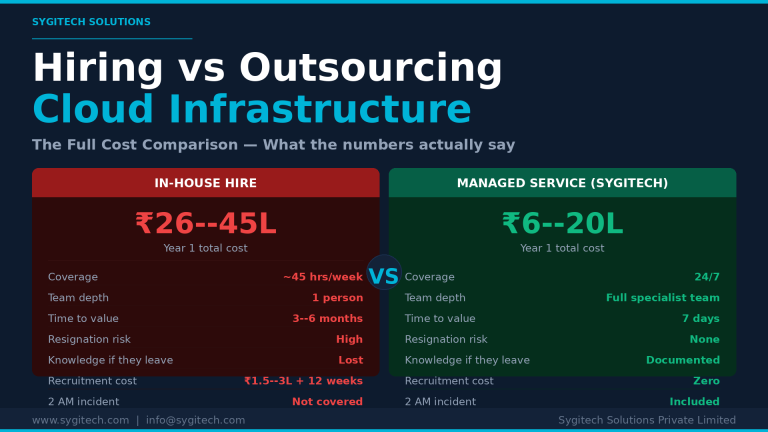
By Sygitech Solutions | Cloud Infrastructure Management & DevOps Most SaaS founders and CTOs eventually face the same decision: should we hire a dedicated DevOps or cloud engineer, or should…
Discover how cloud offerings transform business operations by providing on-demand access to computing power and storage without hefty infrastructure costs.


Leave a Reply