Every business that stores data online is making a bet — that the cloud provider protecting that data is doing its job. Most of the time, that bet pays off. But when it does not, the consequences range from leaked customer records to complete operational shutdowns. Security in cloud computing is not a niche IT concern anymore. It is the foundation every modern business runs on, and understanding it is non-negotiable whether you run a five-person SaaS startup or a growing ecommerce store.
This guide covers everything you need to know about security in cloud environments — what the real threats are, how responsibility is divided, what best practices actually look like, and how to choose a provider you can trust.
What Is Cloud Security?
Cloud security refers to the set of policies, technologies, controls, and procedures that protect data, applications, and infrastructure hosted in cloud environments. The term covers everything from encrypting files at rest to controlling who can log into your cloud dashboard from which device.
Think of it this way: when your business data lives on physical servers in your own office, you control the locks on the door. When that data moves to the cloud, the locks are partly yours and partly your provider's. Cloud security is the discipline of making sure both sets of locks are working — and that you know exactly which is which.
Security in cloud computing spans three main areas:
Data security: Protecting information from unauthorized access, corruption, or theft — whether it is sitting in storage or moving between systems.
Identity and access management (IAM): Controlling who can access which resources, and under what conditions.
Infrastructure security: Protecting the underlying servers, networks, and virtual machines that run your applications.
For small businesses, SaaS companies, and ecommerce operators, security in cloud environments is especially relevant because these businesses often handle sensitive customer data — payment details, personal information, transaction histories — without the in-house security teams that large enterprises maintain.
Key Insight: According to the Cloud Security Alliance, misconfiguration is the leading cause of cloud data breaches — not sophisticated hacking. Most incidents happen because of preventable setup errors, not technical vulnerabilities.
Why Is Security Important in Cloud Computing?
The short answer: because the consequences of getting it wrong are severe and often irreversible.
Security in cloud computing matters for three concrete reasons. First, regulatory exposure. Businesses operating in India and internationally face compliance requirements under frameworks like India's Information Technology Act, GDPR for European customers, and PCI-DSS for payment processing. A breach that exposes customer data does not just damage reputation — it triggers legal liability.
Second, operational continuity. A ransomware attack on your cloud environment can take your entire product offline. For an ecommerce business running during a peak sales period, or a SaaS company with paying customers expecting uptime, even a few hours of downtime translates directly into lost revenue and customer churn.
Third, customer trust. Your customers are handing you their data. They expect you to protect it. A single publicized breach can permanently alter how potential customers perceive your brand, regardless of how quickly you respond.
Industry data consistently shows the scale of the problem. IBM's Cost of a Data Breach Report found that the average cost of a data breach reached USD 4.45 million globally — with cloud-related breaches accounting for a significant share. For smaller businesses, the financial impact is proportionally even more damaging because they lack the reserves to absorb it.
Common Cloud Security Threats and Risks
Understanding what you are defending against makes every security decision more focused. Here are the threats that most directly affect businesses using cloud infrastructure.
Misconfiguration
A cloud storage bucket left publicly accessible. A firewall rule that exposes an internal API. An admin account with permissions far broader than the role requires. Misconfiguration is the most common root cause of cloud security incidents, and it happens because cloud platforms are complex and the default settings are not always secure.
Unauthorized Access and Credential Theft
Attackers do not always break in — sometimes they walk through the front door using stolen credentials. Phishing attacks targeting employees, weak passwords, and the absence of multi-factor authentication (MFA) make credential theft one of the most straightforward attack vectors in cloud environments.
Insider Threats
Not every threat comes from outside. Employees with legitimate access can misuse data, whether intentionally or accidentally. A developer who copies a production database to a personal account, or a departing employee whose access was not revoked, represents a real risk in any cloud environment.
Data Breaches and Data Loss
Unauthorized access to sensitive data — customer records, financial information, intellectual property — is the outcome most businesses fear most. Data loss, distinct from theft, can also occur through accidental deletion, hardware failure, or inadequate backup practices.
Account Hijacking
If an attacker gains control of a cloud account with administrative privileges, they can do significant damage quickly — deleting resources, exfiltrating data, or using your infrastructure to launch attacks on others.
Insecure APIs
Cloud services communicate through APIs. An API that lacks proper authentication or exposes more data than necessary becomes a vulnerability that attackers actively probe.
The Shared Responsibility Model in Cloud Security
This is the concept that most businesses misunderstand — and that misunderstanding is directly responsible for many preventable breaches.
The shared responsibility model defines what your cloud provider secures versus what you are responsible for securing yourself. The exact division depends on the service model you use.
How Responsibility Divides by Service Type
Service Model
Provider Secures
You Secure
IaaS (Infrastructure as a Service)
Physical hardware, network, hypervisor
OS, applications, data, access controls
PaaS (Platform as a Service)
Hardware, OS, runtime environment
Applications, data, user access
SaaS (Software as a Service)
Hardware, OS, application infrastructure
Data, user accounts, access permissions
The critical takeaway: even with SaaS tools like Google Workspace or Salesforce, you are still responsible for who has access to your account, how you configure permissions, and what data you store there. The provider secures the platform — you secure your use of it.
For ecommerce businesses running on platforms like Shopify or WooCommerce on a managed cloud host, this means your provider handles server-level security, but you are responsible for your admin credentials, third-party plugins, and customer data handling practices.
For SaaS product companies building on AWS, Azure, or Google Cloud, the division is more complex — you own the security of everything you build on top of the provider's infrastructure.
Cloud Security Best Practices
Securing the cloud does not require an enterprise security team. It requires consistent application of a core set of practices that address the most common attack vectors.
1. Enable Multi-Factor Authentication Everywhere
MFA is the single highest-impact security control for most businesses. It means that even if an attacker steals a password, they cannot log in without the second factor. Enable MFA on every cloud account — admin accounts, developer accounts, and any account with access to sensitive data.
2. Apply the Principle of Least Privilege
Every user and every application should have only the permissions they need to do their job — nothing more. A marketing team member does not need database access. A read-only API key should not have write permissions. Audit permissions regularly and remove access that is no longer needed.
3. Encrypt Data at Rest and in Transit
Encryption means that even if data is accessed without authorization, it is unreadable without the decryption key. Most cloud providers offer encryption by default, but you should verify it is enabled and understand who holds the encryption keys.
4. Maintain Regular Backups
Backups are your recovery option when everything else fails. Store backups separately from your primary environment — ideally in a different region or provider — and test restoration regularly. A backup you have never tested is not a backup you can rely on.
5. Monitor for Anomalous Activity
Cloud providers offer logging and monitoring tools — AWS CloudTrail, Azure Monitor, Google Cloud Logging — that record every action taken in your environment. Set up alerts for unusual activity: logins from unexpected locations, large data downloads, permission changes made outside business hours.
6. Keep Software and Dependencies Updated
Unpatched software is one of the most exploited attack vectors. Establish a regular patching schedule for operating systems, application dependencies, and any third-party libraries your product uses.
7. Use Cloud Access Security Brokers Where Needed
Cloud access security brokers (CASBs) are tools that sit between your users and cloud services, enforcing security policies and providing visibility into how cloud applications are being used. For businesses with multiple cloud tools and distributed teams, CASBs provide a centralized layer of control that individual app settings cannot replicate. They are particularly useful for SaaS companies managing data across several cloud platforms simultaneously.
How to Choose a Secure Cloud Provider
Not all cloud providers approach security in cloud environments with the same rigor. Here is what to evaluate before committing.
Certifications and Compliance
Look for providers with recognized security certifications. ISO 27001 demonstrates a systematic approach to managing information security. SOC 2 Type II reports show that security controls have been independently audited over time. For businesses handling payment data, PCI-DSS compliance is non-negotiable. Ask providers directly for their current certifications and audit reports.
Data Residency and Sovereignty
For businesses operating in India or serving Indian customers, data residency matters. Some regulations require that certain categories of data be stored within national borders. Ask your provider where your data is physically stored and whether you can specify a region.
Security Features Included vs. Add-On
Some providers include encryption, DDoS protection, and identity management as standard. Others charge separately for security features that should be baseline. Understand what is included in your plan before signing.
Incident Response and Support
When something goes wrong — and in a long enough timeline, something will — how quickly does your provider respond? What does their incident response process look like? Do they offer 24/7 support, and is that support accessible on your plan tier?
Transparency and Breach Notification
Reputable providers publish security incident reports and have clear breach notification policies. They tell you what happened, when, and what they did about it. Providers who are opaque about security incidents are providers you should approach with caution.
Cloud Security Compliance and Standards
Compliance and security are related but not the same thing. Compliance means meeting a defined standard. Security means actually protecting your systems. You can be compliant without being secure — but achieving recognized compliance frameworks pushes you toward better security practices.
Key Standards Relevant to Cloud Environments
ISO/IEC 27001 is the international standard for information security management systems. It provides a framework for identifying risks and implementing controls. Certification requires an independent audit and ongoing surveillance.
SOC 2 (Service Organization Control 2) is particularly relevant for SaaS companies. It evaluates controls related to security, availability, processing integrity, confidentiality, and privacy. A SOC 2 Type II report covers a period of time (usually six to twelve months) and is often required by enterprise customers before they will sign a contract.
PCI-DSS (Payment Card Industry Data Security Standard) applies to any business that stores, processes, or transmits cardholder data. Ecommerce businesses that accept card payments must comply with PCI-DSS, even if they use a payment processor — the standard applies to how you handle card data in your environment.
GDPR applies to any business handling personal data of individuals in the European Union, regardless of where the business is based. For Indian SaaS companies with European customers, GDPR compliance is a legal requirement, not optional.
India's DPDP Act (Digital Personal Data Protection Act, 2023) establishes requirements for how businesses collect, process, and store personal data of Indian residents. Cloud environments that handle Indian customer data must align with these requirements as the Act's implementing rules are finalized.
Understanding cloud computing security standards is essential for any business that wants to operate with confidence across these frameworks. For businesses building toward compliance, the practical step is to start with the framework most relevant to your customers and work backward to identify the security controls you need to implement.
For teams exploring how to secure cloud server infrastructure specifically — particularly the server-level hardening, access control, and monitoring steps — that topic deserves its own focused treatment beyond the scope of this overview.
Common Questions About Security in Cloud
What is the difference between cloud security and traditional IT security?
Traditional IT security focuses on protecting physical infrastructure — servers in your building, devices on your network, data behind your firewall. Security in cloud environments extends that responsibility to infrastructure you do not physically control, shared with other tenants, and accessible from anywhere. The principles are similar, but the attack surface is larger and the tools are different. Cloud security requires specific knowledge of cloud-native controls, the shared responsibility model, and how to configure security in environments that are programmable and highly dynamic.
Is the cloud actually secure for small businesses?
The major cloud providers — AWS, Google Cloud, Microsoft Azure — invest more in physical and infrastructure security than any small business could independently. The risks for small businesses come not from the provider's infrastructure but from how the business configures and uses that infrastructure. A small business that enables MFA, applies least-privilege access, and keeps software updated is operating more securely in the cloud than it would on aging on-premise hardware. Security in cloud environments is accessible to small businesses — it requires discipline, not large budgets.
What does a Certified Cloud Security Professional do?
A Certified Cloud Security Professional (CCSP) is an individual who has earned a certification from (ISC)² demonstrating expertise in cloud security architecture, design, operations, and service orchestration. The CCSP credential, recognized globally, validates that a professional understands how to design and manage security in cloud environments across all major service models. For businesses hiring cloud security talent, the CCSP is one of the most credible credentials to look for. For individuals working in cloud and security roles, it represents a structured path to demonstrating expertise.
How does encryption work in cloud security?
Encryption converts readable data into an unreadable format that can only be decoded with the correct key. In cloud environments, encryption operates at two levels. Encryption at rest protects data stored in databases, file systems, and backups — so that even if storage media is accessed without authorization, the data is unreadable. Encryption in transit protects data moving between systems — between your users and your application, or between services within your cloud environment. Most providers handle encryption at rest by default, but you should verify the configuration and understand the key management model — who holds the keys, and what happens to your data if the relationship with the provider ends.
What is the role of cloud access security brokers in enterprise security?
Cloud access security brokers serve as intermediaries between users and cloud services, enforcing security policies that individual cloud applications cannot enforce on their own. They provide visibility into shadow IT — cloud tools employees use without IT approval — and can enforce controls like data loss prevention, conditional access, and encryption across multiple cloud services simultaneously. For organizations managing cloud information security across a complex environment of SaaS tools and cloud platforms, CASBs reduce the risk that comes from fragmented visibility and inconsistent policy enforcement.
Conclusion
Security in cloud computing is manageable when you understand the landscape clearly — the shared responsibility model, the real threats, and the practical controls that address them. The businesses that get this right are not the ones with the largest security budgets. They are the ones that apply consistent fundamentals and choose providers they can trust.
Explore Sygitech's Managed Cloud Services to run your cloud infrastructure with security, compliance, and operational efficiency built in from day one — no dedicated security team required. Ready to get started? Visit Sygitech to learn more.
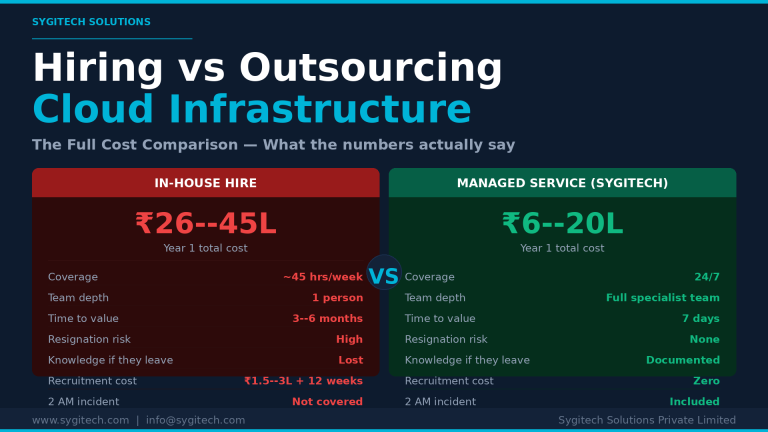
By Sygitech Solutions | Cloud Infrastructure Management & DevOps Most SaaS founders and CTOs eventually face the same decision: should we hire a dedicated DevOps or cloud engineer, or should…
Discover how cloud offerings transform business operations by providing on-demand access to computing power and storage without hefty infrastructure costs.



Leave a Reply