Amazon Web Services — commonly searched as "AWS web services" or simply AWS — is the world's largest cloud computing platform, powering everything from small startup apps to Netflix, NASA, and the Indian government's digital infrastructure. If you have heard the term but are not sure what it actually means for your business, you are in the right place. This guide covers what AWS web services are, how they work, what they cost, and whether they make sense for your situation.
What Is AWS (Amazon Web Services)?
Amazon Web Services (AWS) is a cloud computing platform operated by Amazon that delivers on-demand IT resources — servers, storage, databases, networking, and software — over the internet. Instead of buying physical hardware and managing it yourself, you rent what you need from AWS and pay only for what you use.
AWS launched in 2006 and now operates from 33 geographic regions around the world, with multiple data centers in each region. According to Amazon Web Services, the platform currently offers over 200 fully featured services, making it the most comprehensive cloud provider available.
Think of AWS web services as a massive utility grid — the same way you do not build your own power plant to run your office lights, you do not need to build your own data center to run your applications. You plug into the grid and pay for what you consume.
For businesses in India — whether you are running an e-commerce store, a SaaS product, or a small business website — AWS web services give you access to enterprise-grade infrastructure without enterprise-grade upfront costs. The AWS Mumbai region (ap-south-1) and Hyderabad region (ap-south-2) mean your data can stay within India's borders, which matters for compliance and latency.
AWS vs Other Cloud Providers
AWS web services do not exist in a vacuum. Three major players dominate the cloud market, and understanding where AWS sits helps you make a smarter choice.
Comparison of Major Cloud Providers
Provider
Market Share
Strengths
Best For
AWS (Amazon)
~31%
Broadest service catalog, global reach, mature ecosystem
Startups, SaaS, enterprises needing flexibility
Microsoft Azure
~25%
Deep Microsoft integration, hybrid cloud
Businesses already using Microsoft 365, Windows Server
Google Cloud (GCP)
~11%
Data analytics, machine learning, Kubernetes
Data-heavy workloads, AI/ML projects
Others (IBM, Oracle, etc.)
~33%
Specialized vertical solutions
Industry-specific compliance requirements
AWS web services hold the largest single share of the cloud market. That dominance means a larger talent pool, more third-party integrations, and more documentation than any competing platform. When something breaks at 2 AM, the answer is almost certainly already on Stack Overflow.
The honest limitation: AWS web services can feel overwhelming to new users. The console has hundreds of options, pricing is complex, and the learning curve is steeper than Google Cloud's cleaner interface. Azure wins for teams already living in the Microsoft ecosystem. But for raw capability and flexibility, AWS web services remain the benchmark.
Key AWS Services and Products
AWS web services are organized into categories. You do not need all of them — most businesses use a handful of core services. Here is what actually matters.
Compute
EC2 (Elastic Compute Cloud): Virtual servers you can spin up in minutes. Choose your CPU, RAM, and operating system. This is the foundation most applications run on.
Lambda: Run code without managing servers at all. You upload a function, AWS runs it when triggered, and you pay per execution. Ideal for event-driven SaaS features.
Elastic Beanstalk: Deploy web applications without configuring the underlying infrastructure. Good for teams that want AWS power without deep DevOps knowledge.
Storage
S3 (Simple Storage Service): Object storage for files, images, backups, and static website assets. Virtually unlimited capacity, 99.999999999% durability, and very low cost per GB.
EBS (Elastic Block Store): Persistent disk storage attached to EC2 instances. Works like a hard drive for your virtual server.
Glacier: Long-term archival storage at extremely low cost — useful for compliance backups you rarely access.
Databases
RDS (Relational Database Service): Managed MySQL, PostgreSQL, MariaDB, Oracle, and SQL Server. AWS handles patching, backups, and failover.
DynamoDB: A fully managed NoSQL database built for high-speed, high-scale applications. Popular with SaaS products that need millisecond response times.
Aurora: AWS's own MySQL and PostgreSQL-compatible database engine, up to five times faster than standard MySQL.
Networking and Delivery
CloudFront: A content delivery network (CDN) with edge locations across India and globally. Your static assets load faster because they serve from the nearest location to your user.
Route 53: DNS management and domain routing. Also handles health checks and traffic failover.
VPC (Virtual Private Cloud): Your own isolated network within AWS web services, with full control over IP ranges, subnets, and security rules.
Security and Identity
IAM (Identity and Access Management): Controls who can access what within your AWS account. Proper IAM configuration is the single most important security step for any AWS deployment.
AWS Shield: DDoS protection, automatically applied to all AWS web services at the standard tier.
KMS (Key Management Service): Encryption key management for data at rest and in transit. Security in cloud environments depends heavily on getting this right.
How AWS Works
AWS web services operate on a shared responsibility model. AWS manages the physical infrastructure — the data centers, the hardware, the network cables, the cooling systems. You manage what runs on top of it — your operating system configuration, your application code, your data, and your access controls.
Here is how a typical web application on AWS web services actually works:
Request arrives: A user in Mumbai opens your e-commerce website. Their browser sends a request to your domain.
DNS resolution: Route 53 resolves your domain and points the request to your load balancer or CloudFront distribution.
Content delivery: Static assets (images, CSS, JavaScript) serve directly from CloudFront edge locations, reducing load time significantly.
Compute layer: Dynamic requests hit your EC2 instances or Lambda functions, which run your application code.
Database query: Your application queries RDS or DynamoDB to retrieve product data, user accounts, or order history.
Response returns: The assembled response travels back to the user, typically in under 200 milliseconds for well-configured setups.
The key concept here is elasticity. AWS web services can automatically scale your compute capacity up during a sale event and back down when traffic normalizes — you only pay for the capacity you actually used.
AWS Pricing and Cost Structure
AWS web services pricing is pay-as-you-go by default, but there are three main pricing models you should understand before you commit to anything.
AWS Pricing Models
Model
How It Works
Best For
Savings vs On-Demand
On-Demand
Pay per hour or second, no commitment
Testing, unpredictable workloads
Baseline (no discount)
Reserved Instances
Commit to 1 or 3 years upfront or monthly
Steady, predictable workloads
Up to 72% savings
Spot Instances
Bid on unused AWS capacity
Batch jobs, non-critical processing
Up to 90% savings
Savings Plans
Commit to a spend level for 1-3 years
Mixed workloads across services
Up to 66% savings
The AWS Free Tier is a real starting point — not just a marketing promise. New accounts get 12 months of limited free access to EC2, S3, RDS, and Lambda. The Lambda free tier (1 million requests per month) never expires, which means many small SaaS applications run Lambda functions at zero cost indefinitely.
Real-world cost example: A small e-commerce application running on a t3.medium EC2 instance (2 vCPU, 4 GB RAM) in the Mumbai region costs approximately $0.0416 per hour on-demand — roughly $30 per month for continuous operation. Add an RDS db.t3.micro for your database, 50 GB of S3 storage, and standard data transfer, and a complete production stack for a small business typically runs between $50 and $150 per month, depending on traffic.
Key Insight: The AWS Cost Explorer tool shows exactly where your money is going, broken down by service, region, and time period. Enable it from day one — surprise AWS bills are a common pain point for teams that skip this step.
The most common mistake is not using Reserved Instances once your workload stabilizes. If you know you need a server running 24/7, a 1-year Reserved Instance cuts that cost nearly in half compared to on-demand pricing.
Is AWS Right for Your Business?
AWS web services are not the right answer for every situation. Here is an honest assessment by business type.
Small Businesses
AWS web services make sense if you need a reliable, scalable hosting environment without managing physical hardware. A WordPress site on EC2 or a managed hosting setup through AWS Lightsail (AWS's simplified VPS web hosting service) gives you more control and often better performance than shared hosting at a comparable price point.
The challenge: AWS requires more technical knowledge than managed WordPress hosts like Kinsta or WP Engine. If you do not have someone comfortable with cloud configuration, you may spend more time managing AWS than running your business.
SaaS Product Companies
This is where AWS web services genuinely excel. The combination of auto-scaling compute, managed databases, serverless functions, and global CDN gives SaaS teams exactly what they need to build and scale products without building infrastructure teams. Most successful Indian SaaS companies — Zoho, Freshworks, Chargebee — built on AWS or migrated to it as they scaled.
The cost model also aligns well with SaaS growth: you pay more as your revenue grows, rather than making large upfront infrastructure investments before you have product-market fit.
E-Commerce
High-traffic e-commerce operations benefit significantly from AWS web services. CloudFront reduces page load times, auto-scaling handles traffic spikes during sales events, and S3 provides cost-effective media storage. The AWS cloud computing architecture is specifically designed for the kind of variable, spiky traffic that e-commerce generates.
The consideration: smaller e-commerce stores with steady, predictable traffic may find Shopify or managed WooCommerce hosting simpler and cheaper to operate. AWS web services rewards teams willing to invest in configuration and optimization.
Getting Started with AWS
Starting with AWS web services does not require a large technical team or a big budget. Here is the practical path.
Create your AWS account: Go to aws.amazon.com and sign up. You will need a credit card, but the Free Tier means most learning and testing costs nothing in the first year.
Set up IAM properly from day one: Create an IAM user with limited permissions for your daily work. Never use your root account for regular operations. Enable multi-factor authentication on the root account immediately.
Choose your region: For Indian businesses, ap-south-1 (Mumbai) is the default choice. If your users are primarily in South India, ap-south-2 (Hyderabad) may offer better latency.
Start with one service: Launch an EC2 instance or an S3 bucket. Follow the AWS Getting Started documentation for your specific use case. Do not try to learn everything at once.
Enable billing alerts: Set a CloudWatch billing alarm before you do anything else. This prevents unexpected charges if you accidentally leave resources running.
Use the AWS Well-Architected Framework: This free resource from AWS covers the five pillars of a well-built cloud system — operational excellence, security, reliability, performance efficiency, and cost optimization. It is the closest thing to a definitive best practices guide for AWS web services.
The AWS Management Console (the web interface for AWS web services) can feel overwhelming at first. The search bar at the top is your friend — type the service name and navigate directly rather than browsing menus.
Common Questions About AWS Web Services
What does "AWS" actually stand for?
AWS stands for Amazon Web Services. The name reflects its origin as Amazon's internal infrastructure that the company eventually opened to external customers. The "web services" part refers to the delivery model — services accessed over the internet via APIs, rather than software installed on local machines.
Is AWS web services the same as Amazon cloud services?
Yes. Amazon cloud services, AWS web services, AWS Amazon web, and Amazon Web Services all refer to the same platform. The full official name is Amazon Web Services. AWS is the standard abbreviation used in technical and business contexts. You may also see "amazon web server aws" in search queries — this is not a distinct product, just a common way people search for information about EC2 (Amazon's virtual server service).
How secure is AWS for storing business data?
AWS web services meet the compliance requirements for some of the world's most security-sensitive industries — healthcare (HIPAA), financial services (PCI DSS), and government (FedRAMP). AWS holds over 143 security certifications globally. That said, security in cloud environments is a shared responsibility. AWS secures the infrastructure; you are responsible for configuring your applications, access controls, and encryption correctly. Most AWS security incidents trace back to misconfigured IAM permissions or publicly accessible S3 buckets — both preventable with proper setup.
Can a small business with no IT staff use AWS?
It is possible but challenging without some technical support. AWS web services reward teams with cloud knowledge and penalize teams that configure things incorrectly — both in cost (leaving resources running) and security (misconfigured permissions). For small businesses without IT staff, a managed cloud services provider who handles AWS configuration and monitoring on your behalf is often the smarter path. You get the benefits of AWS web services without carrying the operational burden yourself.
What is the difference between AWS and traditional web hosting?
Traditional web hosting gives you a fixed amount of server space at a fixed monthly price. AWS web services give you on-demand access to a global infrastructure platform where you can scale from one server to thousands in minutes. Traditional hosting is simpler and cheaper for basic websites. AWS is more complex and more powerful — the right choice when you need scalability, global reach, or specialized services like AI and cloud integration, managed databases, or serverless computing that traditional hosts cannot provide.
What This Means for You
AWS web services give Indian businesses — from solo founders to growing SaaS teams — access to the same infrastructure that powers the world's largest companies, at a price that scales with your actual usage. The learning curve is real, but the capability is unmatched.
Explore how Sygitech's managed cloud services take the operational complexity off your plate — so your team focuses on building your product, not managing your infrastructure. Ready to get started? Visit Sygitech to learn more.
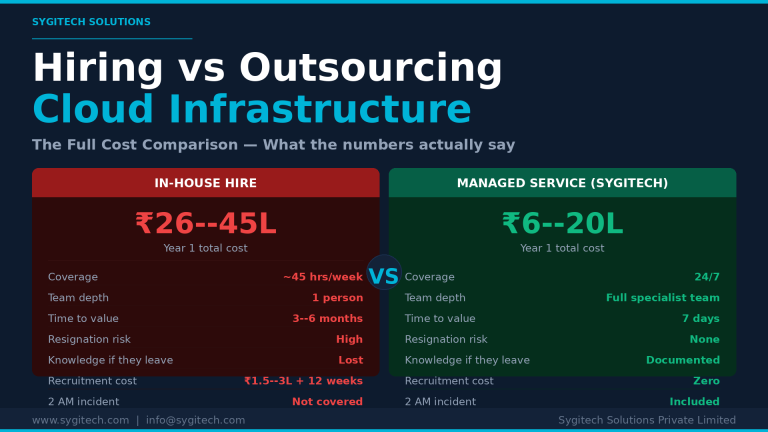
By Sygitech Solutions | Cloud Infrastructure Management & DevOps Most SaaS founders and CTOs eventually face the same decision: should we hire a dedicated DevOps or cloud engineer, or should…
Discover how cloud offerings transform business operations by providing on-demand access to computing power and storage without hefty infrastructure costs.





Leave a Reply